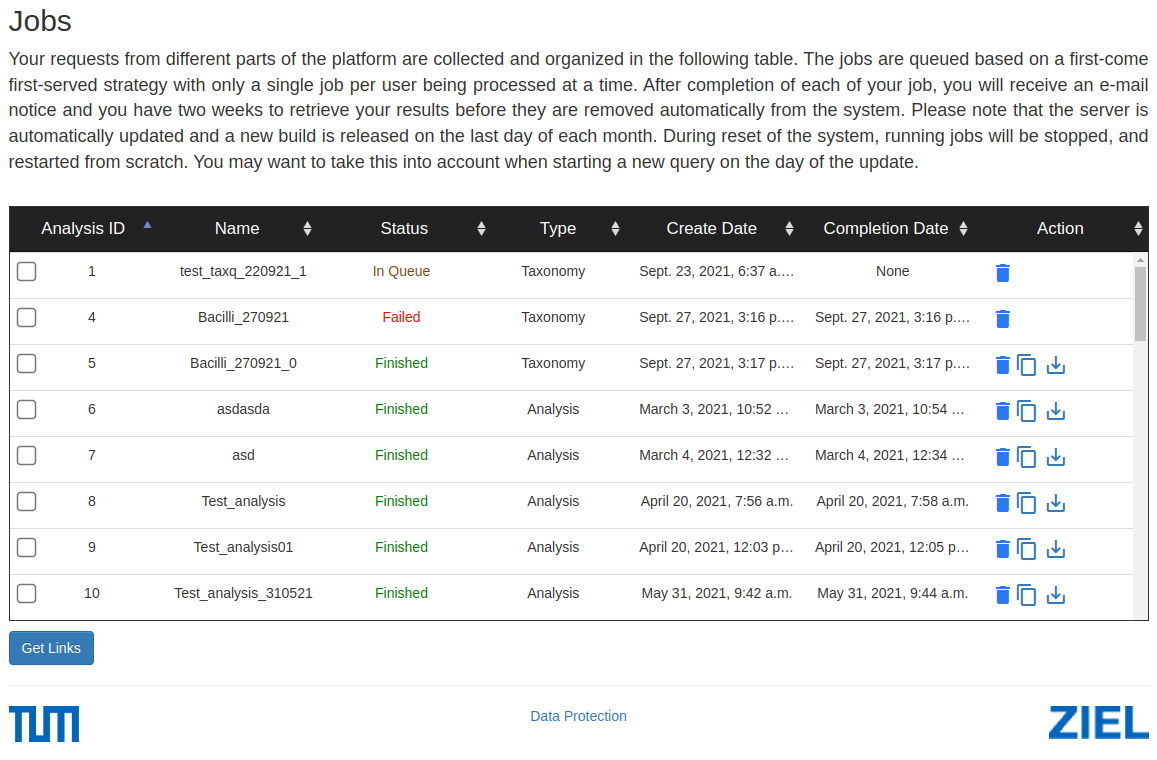
Jobs View
On the Jobs page, there is a view with the status of your submitted jobs.
# Jobs Table Explanation
This table displays the status and details of your submitted jobs on the platform. Below is an explanation of each column in the table:
Analysis ID: A unique identifier assigned to each submitted job. Use this to differentiate between multiple submissions.
Name: The custom name you assigned to the job when it was created. This helps you quickly identify the purpose or type of the job.
Status: Indicates the current state of the job: - In Queue: The job is waiting to be processed. - Finished: The job has been completed successfully. - Failed: The job encountered an error and was not completed.
- Type: Specifies the category or type of analysis that was performed. This helps understanding what kind of operation was executed.
Taxonomy: Querying the sequences based on taxonomy.
Analysis: 16S analysis of a group of sequences.
Create Date: The date and time when the job was submitted to the system.
Completion Date: The date and time when the job was finished or failed. If the job is still in the queue, this field will be empty.
Action: This column provides buttons for further actions: - Trash icon: Delete the job from the system. - Download icon: Download the results of the job once it is completed. - Copy icon: Copy the link to the job results for easy sharing.
Make sure to check the Status column to know when the job was finished or if it failed, and use the appropriate actions to download or delete the results.